7 Day Statement of Trade Report
This report provides a consolidated view of all sales and financial activity over a given week, bringing together front of house and back of house operations in one place. Use the drill-down functionality to access detailed breakdowns and supporting reports for deeper analysis.
7 Day Statement of Trade Report Topics
Opening the Report
Follow these steps to open the report:
-
Select the Section
If you are operating a Site Master or Site installation of Aztec this will be automatically populated as your own site location -
Select the required Layout (optional)
-
Choose the required Week
This report is designed to only be viewed by week -
Click View Report
Layout - Gross
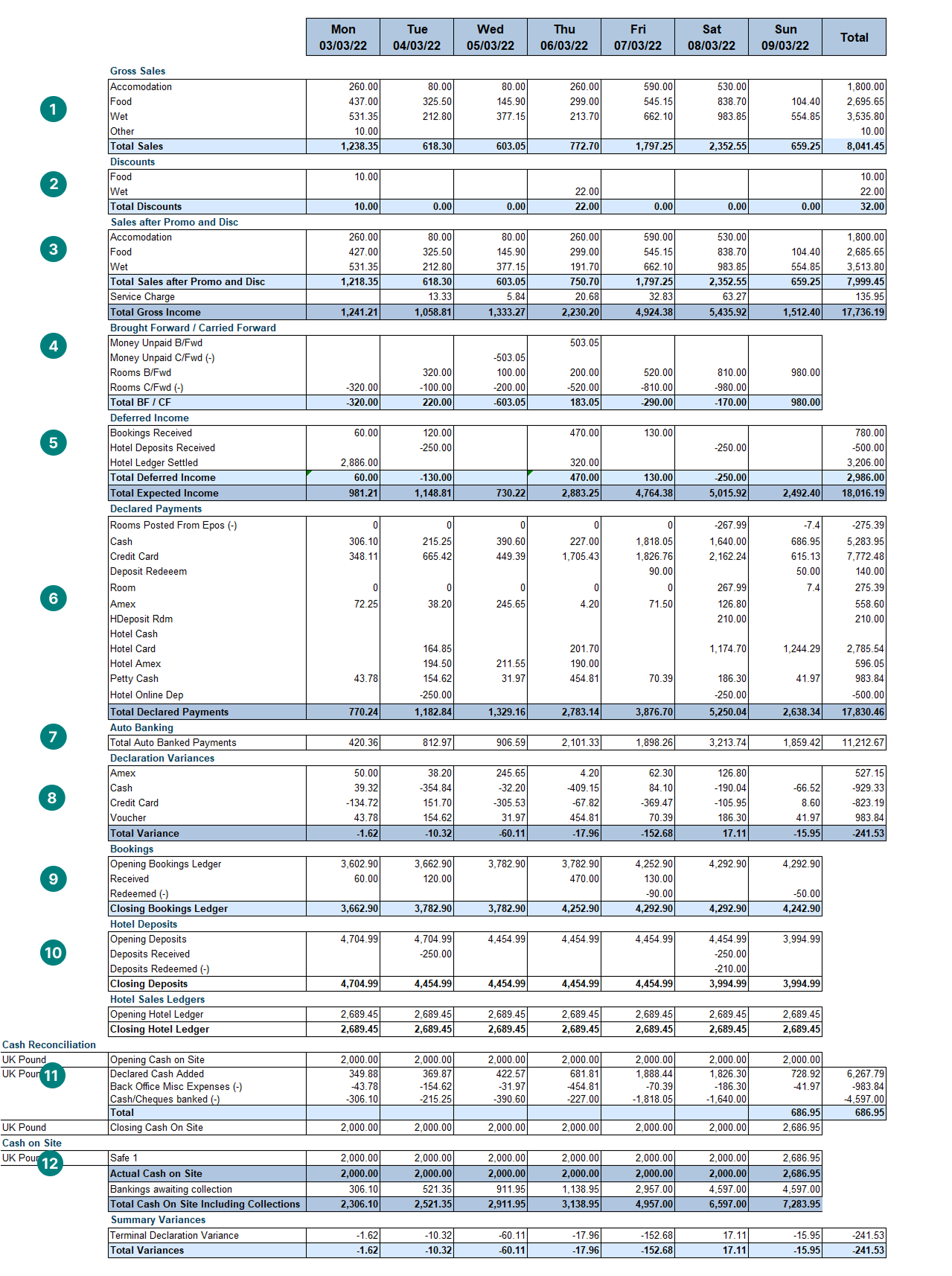
This layout displays all sales, promotions, discounts, and financial activity in a gross value.
-
Gross Sales by Division
-
Discounts (if promotions are used these are also displayed as an additional section)
-
Right Click → Drill Through to Promotions or Discounts Reports
-
-
Gross Sales by Division after Promotions and Discounts (the sales you actually took) plus any tips and service charge
-
Right Click → Drill Through to Product Sales
-
-
Brought Forward and Carried Forward Balances
-
These only show if there are open accounts (unpaid) or you have hotel sales transactions that have room balances carried forward (guests checked in)
-
Right Click → Drill Through to Closed Accounts
-
-
Deferred Income (money taken where there is no direct sale, for example deposits and sales ledger transactions)
-
Declared Payments (payments taken through point of sale terminals or through hotel transactions that are imported, that have been declared)
-
Auto Banking (total of any payments that are not manually banked, such as cash)
-
Declaration Variances (summary by payment method of any variances from declarations)
-
Booking Deposits (summary of received, redeemed and forfeited deposits)
-
Right Click → Drill Through to Bookings Reports
-
-
Hotel Deposits & Ledgers (summary of received, redeemed and forfeited deposits), this is only applicable if hotel sales are imported into Aztec
-
Cash Reconciliation (summary of activities completed in the finance module)
-
Right Click → Drill Through to Finance Reports
-
-
Cash on Site (summary of cash on site and bankings awaiting collections)
Layout - Net
This layout displays all sales, promotions, discounts, and financial activity in a net value along with the tax collected.