Assigning Hotel Divisions
Hotel Divisions are used for two options in Aztec:
-
Hotel PMS Interfaces: when used for PMS interfaces hotel divisions are assigned to product sub-categories so that revenue can be grouped by division when sent to the property management system.
-
Bill Product Summary Breakdown: when used for the summary breakdown products can be grouped on printed materials (bills / receipts) to show a summary of products by that hotel division.
For products to be correctly linked to hotel divisions, sub-categories are assigned a hotel division and in turn any product sold through this sub-category will be reported against the hotel division.
To assign a hotel division:
-
Select Theme Modelling from the Aztec Start Page
-
Click Estate Setup and select the tab named Config Sets
-
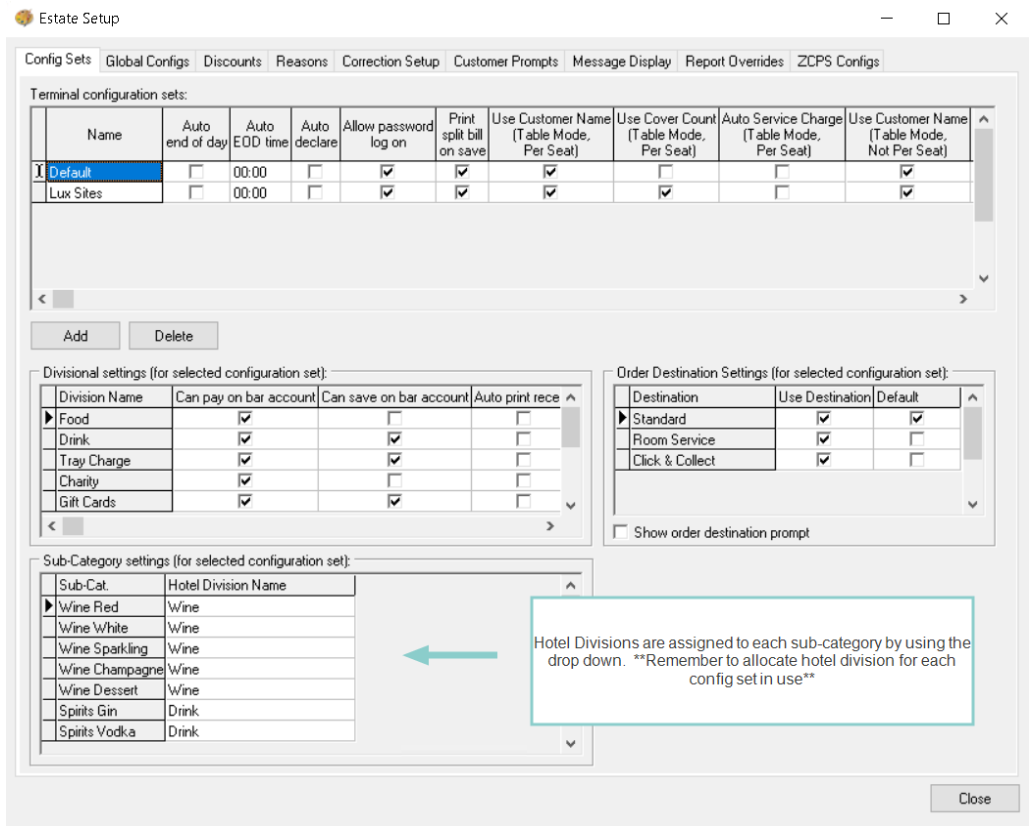
From the Config Sets tab listed choose the required set by clicking on the row
For each config set created and being used by a site with hotel interface, or being used for bill product summary breakdown, each one has to be selected and assigned its hotel divisions
-
In the Sub-Category Settings section using the drop downs assign the correct hotel division to the sub-category
-
Complete each config set as required for the organisation and when finished click Close